
The exact edition
Interac is a familiar Canadian payment name, but a casino cashier still needs to explain the exact service and transaction it offers. This guide focuses on reading that route: the recipient, the bank approval, the amount and the withdrawal conditions. It does not maintain an unverified list of Interac casinos or promise a fixed transfer time, fee or deposit limit for every bank and operator.
Read the full service name in the cashier
Begin with the wording beside the payment control, including any reference to e-Transfer or Autodeposit. A broad Interac label should not be treated as a complete description of the process. Read whether the operator expects you to send, approve a request or receive a transfer, and which account details are used for that particular direction.
The payment methods guide gives a wider comparison framework. Keep the network’s general instructions separate from the casino’s specific cashier steps. This page cannot establish that your financial institution permits a particular payment or that the operator offers the same method to every account or province.
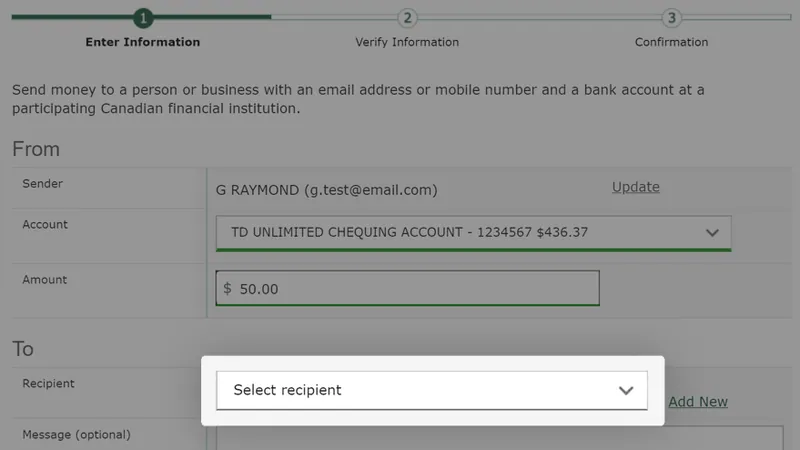
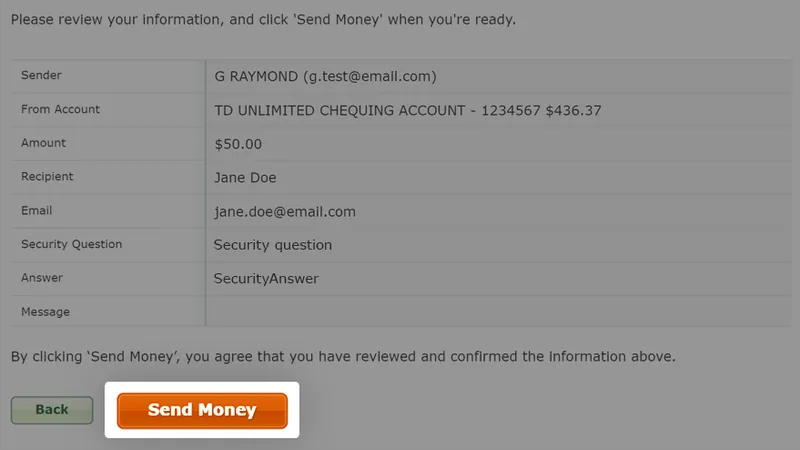
Verify the recipient before confirming a payment
Interac’s official sending instructions include reviewing the recipient and amount before sending. Its security guidance also recommends checking the name and contact details. Use that confirmation stage as a genuine inspection point. If the details differ from those supplied by the current authenticated cashier, stop and resolve the mismatch through the operator’s official support route.
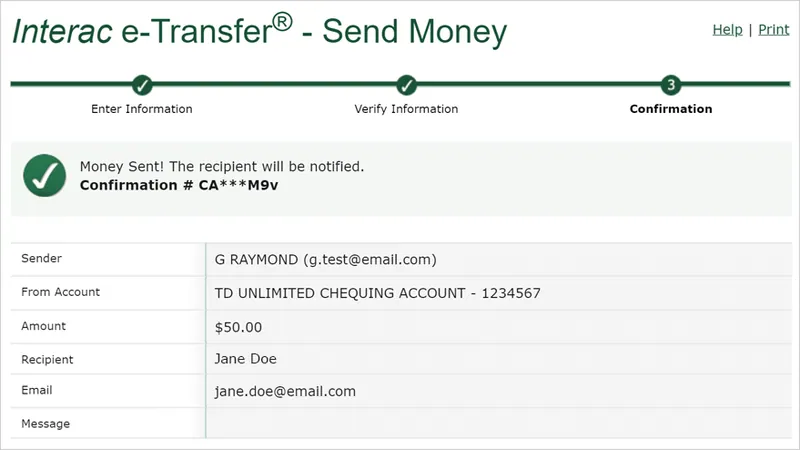
Do not substitute payment instructions from an old message, a search snippet or another site. Keep a transaction reference after confirmation so you can compare the financial-institution record with the cashier entry. The casino checklist explains why a payment logo is only one part of checking an operator’s current information.
Your bank limit and the cashier limit are separate
Interac states that financial institutions set transaction limits. A casino can also display its own limits for the offered route. Record both where they are available and use the conditions that actually apply to your account. This guide deliberately gives no universal dollar figure because that would hide the account-specific part of the decision.
A technical limit is not an appropriate spending recommendation. Choose your own boundary before opening the cashier and do not split a payment to work around a restriction. The session limits guide addresses that planning step. A failed or unavailable transfer is a reason to inspect the status and rules, not to keep trying different amounts blindly.
How to read the round
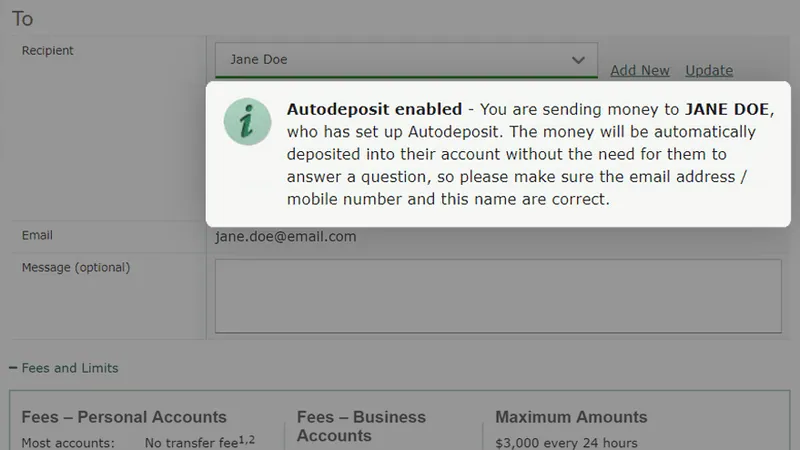
Autodeposit concerns the receiving setup
Interac’s FAQ describes Autodeposit as a registration linking an identifier to a selected account for incoming transfers without a security question. It also notes that the experience and availability vary by financial institution. When a cashier names this route, check which registered identifier it will use and whether it corresponds to the account you intend to receive into.
Do not assume that a previous ordinary e-Transfer establishes every Autodeposit requirement. The receiving setup and the operator’s account verification can be different parts of the process. Read both before submitting a withdrawal. Avoid publishing account identifiers in a review or screenshot; they are transaction information, not evidence that needs to appear in public editorial content.
A withdrawal needs its own eligibility check
OLG’s official help provides a concrete example of an operator distinguishing Standard Bank Transfer and Interac e-Transfer Autodeposit withdrawals. It lists eligibility conditions for those routes. That example shows the type of detail to inspect; it does not transfer OLG’s terms, limits or timing to another casino.
Before depositing elsewhere, find the withdrawal page and identify the allowed destination account, verification requirements and current transaction limits. Our bonus overview is a separate reading route if promotional funds are involved. A withdrawal method being available does not prove that an account balance is free of the conditions attached to a particular offer.
Separate pending, sent and received
After a request, compare the operator’s transaction history with your financial institution’s record. A casino status message and money arriving in the destination account describe different stages. If you need help, preserve the transaction reference, time, amount and the exact status rather than sharing login details or an unredacted banking screen.
This guide makes no general speed promise. Read the current process stated by the operator and the bank, then use the official support channels if the observed state requires clarification. Repeating a request without understanding the first one can make the record harder to follow. The information checklist offers the same useful habit: distinguish what has been confirmed from what remains unknown.
Check fees and promotional eligibility separately
A cashier can accept a route without making it eligible for every promotion. If an offer matters to your decision, read its payment exclusions and other entry conditions before sending money. Do not infer eligibility from an Interac logo in the deposit menu, and do not assume the absence of a cashier fee answers every possible financial-institution charge.
Use wagering requirements to examine the promotion itself. For the payment, keep separate fields for operator fee, bank or service fee and any currency conversion. No values are supplied here without an account-specific source. An honestly incomplete comparison is more useful than a precise-looking fee table that does not apply to your transaction.
Questions about this edition
Can every Canadian casino accept Interac e-Transfer?
This guide does not make that claim. Check the current cashier for the exact operator, account and location, together with your financial institution’s conditions.
Is Autodeposit the same as an ordinary deposit button?
Autodeposit describes a receiving registration in Interac’s system. The cashier must explain how it is used for the offered transaction.
Where should I check a delayed withdrawal?
Compare the operator’s transaction history with your financial institution’s record, preserve the reference and use their official support routes. No universal processing time is assumed.
Editorial conclusion
An Interac payment is best assessed as a specific transaction between a known cashier route and your financial institution. Verify the recipient, applicable limits and receiving setup before confirming. Then keep a clear record of the transaction state. Familiar branding makes the service recognisable; current account and operator instructions determine the actual process.
At a glance
- Focus
- Interac e-Transfer payment checks
- Transfer limits
- Set by the financial institution
- Withdrawal availability
- Check the operator’s current rules
- Checked
- 20 November 2026
Source check: 20 November 2026